

Fee schedules power the Fee Schedule panel on consult notes. The attorney ticks services and sees low, high and starting totals.
Build the fee spreadsheet
Create a CMS matter spreadsheet with one row per service and columns for the service name, the form (optional), and either a single price or a low and high price. See Track anything with matter spreadsheets. Attorneys need read access to it.
Open Consult Fee Schedules
Open Settings, and under CRM Configuration choose Consult Fee Schedules.
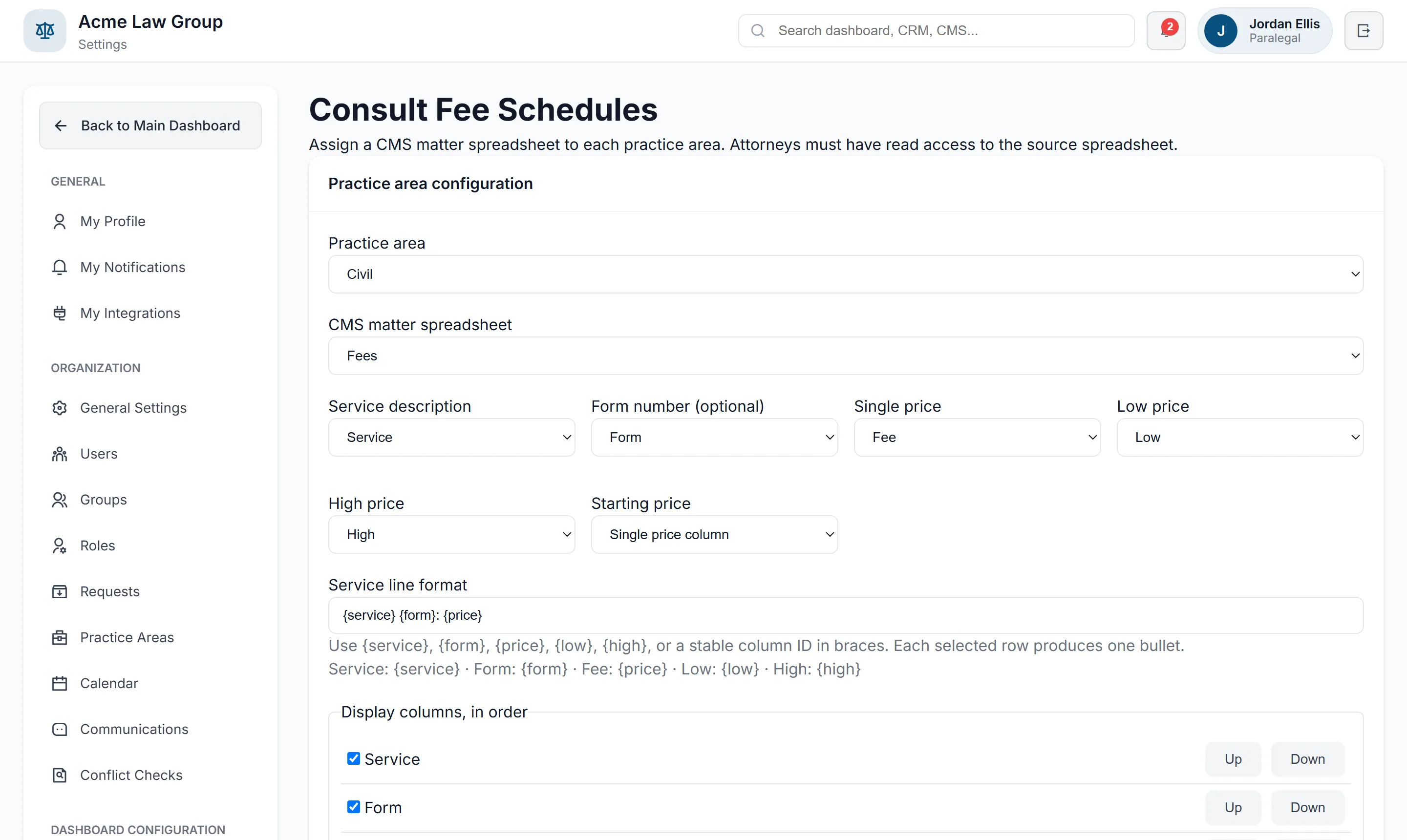
Map a practice area
For each Practice area, choose the CMS matter spreadsheet, then map its columns: Service description, Form number (optional), and the price columns (Single price, Low price, High price, Starting price).
Format the service lines
Service line format controls how each selected service appears in the consult notes. Use placeholders such as {service}, {form}, {price}, {low} and {high}, for example Service: {service} · Form: {form}. Each selected row becomes one bullet.
Save and test
Save, then open Add Consult Notes on a test matter in that practice area and tick a few services.
Last reviewed 2026-11-25