

Spreadsheets are registers your firm designs itself, such as a receipt-notice log or a list of pending applications, that live inside Nexus and link to real matters, contacts and invoices instead of sitting in Excel.
Open a spreadsheet
Spreadsheets appear as tabs in Matters or Billing (your firm names them). Create Spreadsheet sets up a new one, if your role allows. The top shows the number of Entries and money totals.
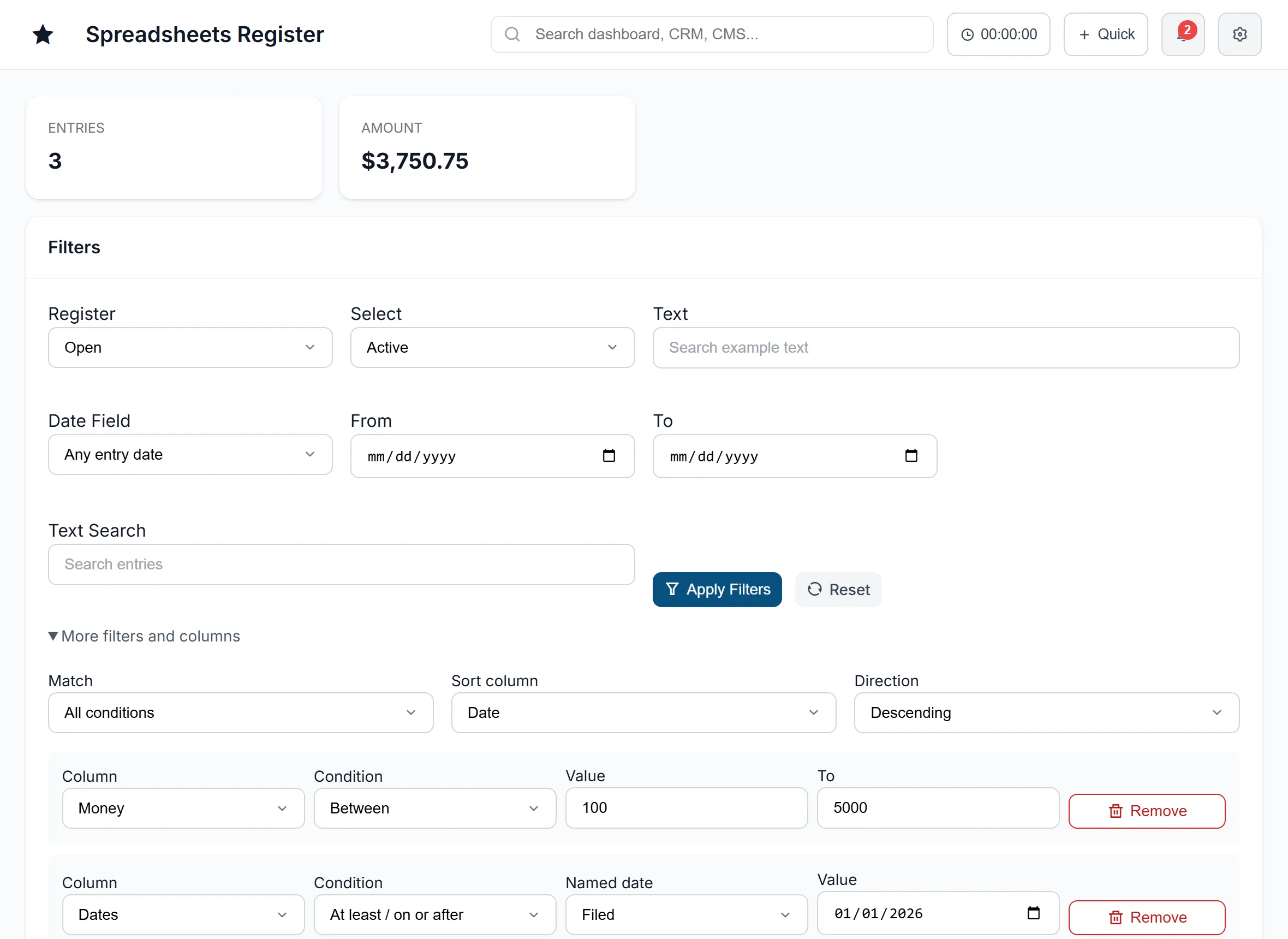
Filter entries
Choose the Register (Open, Archived, Open and Archived, Trash), filter on the sheet's own columns and dates, or use Text Search. More filters and columns adds conditions such as Equals, Is empty, Between and At least / on or after, and lets you match All conditions or Any condition.
Save a view
Pick the visible columns and sort, then Save as new view. Tick Shared view to make it available to colleagues. Update selected view changes it later.
Add and edit entries
Fill in Add Entry. Fields can be text, notes, numbers, money, checkboxes, dates, multi-select, links to a matter, contact, user or invoice / trust request, a URL, an email or a phone. Edit or archive entries from the list.
If your team keeps a spreadsheet on a shared drive that mentions matter numbers, ask your admin to turn it into a matter spreadsheet. Then it's searchable, permissioned and linked.
Last reviewed 2026-11-25